


FlightRadar - Flight Tracker
0.00.00 Reviews
App Specs
- Version
- 2.0.6
- Updated On
- License
- Free
- Downloads
- 500,000+
- Developer
- Fast Tour Booking - Flights & Hotels
- Categories
- Travel & Local
- Platform
- Android
Screenshots

 Analysis by AppCompare
I find a flight tracker most useful when it answers a small, immediate question: Is that aircraft the one my family is waiting for, or where is the plane crossing overhead headed? FlightRadar - Flight Tracker is built around that kind of curiosity, pairing a live flight map with ways to look up journeys. It is a free travel and local app from Fast Tour Booking - Flights & Hotels, and its straightforward purpose is easy to grasp once you open it.
Tracking Flights Like a Pro
Let me start by saying, FlightRadar - Flight Tracker is a dream come true for aviation enthusiasts and curious minds alike. This app allows you to track flights in real-time, providing a bird's-eye view of the skies. Whether you’re at home or on the go, the app’s user-friendly interface makes it super simple to dive into the world of flight tracking.
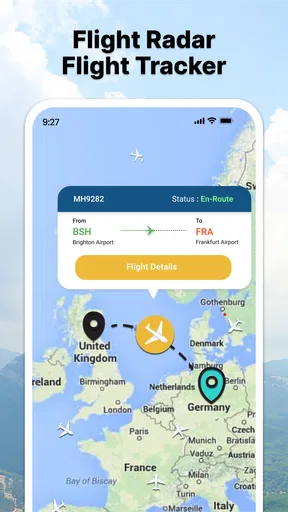
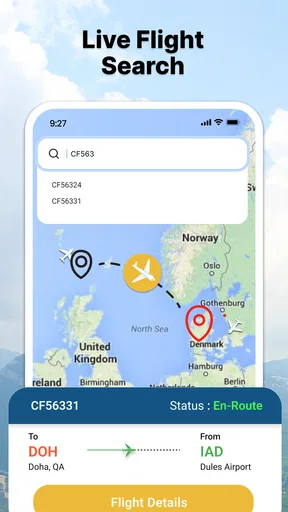
Once you open the app, you’re greeted with a live map of ongoing flights. It’s like having a window into the aviation world, right in your pocket. You can see planes darting across the map, complete with their flight numbers and routes. It’s honestly pretty mesmerizing to watch!
Features Galore
The app offers a range of features that cater to both casual users and serious aviation geeks. You can search for specific flights using flight numbers or by airline. There’s also an option to explore flights departing or arriving at a particular airport. This comes in handy when you’re picking someone up or just curious about the activity at your local airport.
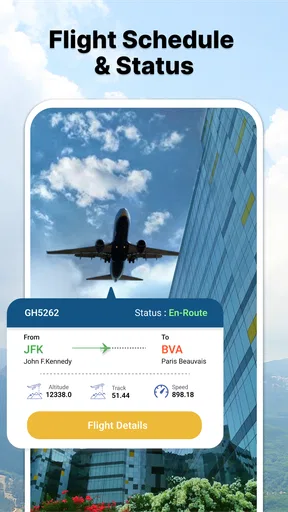
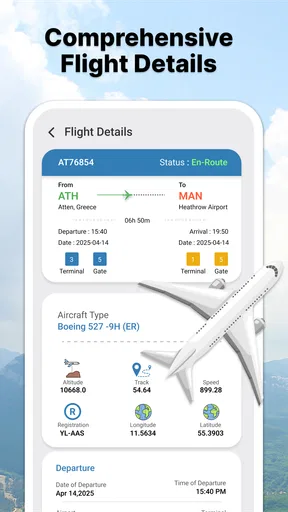
But wait, it gets even cooler! The app provides detailed information about each flight. You get to see the aircraft type, the altitude it's flying at, and even its speed. It's like having a backstage pass to the cockpit.
Diving Deeper
One of my favorite features is the ability to tap on any plane and get a close-up view of its journey. You can see the aircraft’s route, complete with its origin and destination. Plus, it displays the flight's estimated time of arrival, so you’ll never be left guessing when your friend’s flight will finally land.
For those who love a little history, the app also shows past flight data. Curious about where that plane was last week? FlightRadar’s got you covered. It’s like a time machine for flight paths!
Worth Reading Before You Choose

Flipboard Shows What News Apps Must Do Beyond the Feed

Switching to Android Auto Means Rethinking Your Driving Routine

Google Calendar Makes a Crowded Week Easier to Manage

Ludo King Makes the Most of the Minutes Between Plans

Baby Panda World Brings Quick Play to Modern Phones, but Its Game Library Feels Busy

ESPN’s Live Game View Makes Following Close Games Easier
Why It Stands Out
So, what makes this flight tracker stand out from other flight tracking apps? For me, it's the combination of simplicity and depth. The app is incredibly easy to use, but it doesn’t skimp on details. Whether you just want to see what’s flying overhead or dive into the specifics of a flight, this app offers it all.
The real-time updates are spot on, and I rarely experience any lag or inaccuracies. It’s like having a personal radar system right in the palm of your hand.
Finding the Right Flight Without Getting Lost in the Map
A live map is enjoyable to browse, but it can become busy when several aircraft are visible at once. I find it more practical to treat the map as a starting point, then narrow the search using a flight number, airline, or airport when I have a specific journey in mind. That small change in approach saves aimless zooming and makes the app more useful for a time-sensitive question.
For a pickup, I would check the airport’s arrivals and identify the flight I care about rather than infer a landing time from a plane’s position alone. I’d then reopen that flight’s details as the journey progresses. An estimated arrival is helpful for planning when to leave home, but I would still treat it as an estimate, not a guarantee or a substitute for the airline’s own travel notices.
When the App Seems Stuck
If the map does not appear to move, I would first check whether the phone has a working internet connection and give the screen a moment to refresh. A map-based service depends on receiving current information; a weak connection or a brief interruption can make the display look older than it is. Switching between Wi-Fi and mobile data, when available, is a sensible basic check before assuming the flight itself has stopped.
It also helps to confirm that I’m following the intended flight. Similar flight numbers, a changed connection, or looking at departures when I meant arrivals can lead to a convincing but wrong result. I use the flight number when I have it, then compare the route and airport details before relying on the result. That is a better recovery step than repeatedly tapping different aircraft on a crowded map.
Useful Checks Before You Rely on an ETA
For everyday travel, I would use this app alongside the information from the airline or airport rather than as the sole source for a decision. If someone is collecting me, I can share a clearer update by giving them the flight’s current estimated arrival and checking again before they set off. If a connection or gate decision is involved, the airline’s direct updates are the safer place to confirm what to do next.
That division of labor is one of the app’s most useful practical trade-offs. A map makes movement and route context easy to understand, while an airline’s own channels are designed to communicate changes that affect passengers. I would use FlightRadar to see the broader picture and verify consequential arrangements elsewhere.
Perfect for Travel and Curiosity
If you’re a frequent traveler, this app is a must-have. It’s perfect for keeping tabs on your flights and ensuring you’re always in the loop. But even if you’re not jet-setting across the globe, it’s just plain fun to use. I find myself opening the app whenever I hear a plane passing overhead, just to see where it's headed. It’s become a bit of a hobby, to be honest!
For those with kids, it's a great educational tool. You can explore different aircraft types and flight routes together, turning each flight into a mini geography lesson.
A realistic use is a family member waiting at home while a traveler is in the air. I can look up the journey, follow its progress, and send a rough arrival update, so the person collecting them has a better sense of timing. For a child, I’d make the same exercise a geography game: trace the route and talk about the departure and destination, while avoiding promises about exact landing times.
The app is especially suited to people who enjoy checking the sky, want a visual overview, or regularly coordinate airport pickups. It is less compelling if you only need a one-off gate change or a boarding reminder; a carrier’s app or airport display is usually the more direct tool for those tasks. Likewise, anyone who prefers a simple text status over exploring a map may find the visual approach unnecessary.
Choosing Between a Map and a Simple Status Check
Compared with the usual alternatives, FlightRadar’s appeal is the map-first view: it helps me connect an aircraft’s location with its route instead of reading only a status line. That is useful for curiosity and for understanding how a flight is progressing. A search engine or airline page may be quicker when I already know the flight and only want a basic update, while the airline remains the better choice for passenger-specific instructions.
The trade-off is that a map invites interpretation. A plane icon moving toward an airport can feel more definitive than it is, and an estimated arrival can change. I would avoid using the screen to make a tight connection plan or to decide whether a traveler should leave a terminal. It is best as a situational overview, not a promise about what will happen next.
The app is free to download and is rated for Everyone. It has over 100,000 installs, runs on Android 8.0 or later, and its current version is 2.0.4. In-app purchases are available, priced from $9.99 to $39.99 per item, so I would check what an optional purchase covers before deciding whether it adds value to my own use. For occasional checks, I would begin with the free experience and only consider a purchase if I had a clear reason to use it regularly.
When the App Is Not the Cause
Flight information can be affected by circumstances beyond the phone or app. If a flight appears delayed, changes direction, or seems absent from the map, that does not by itself tell me why. I would check the airline or airport for the passenger-facing status, then return to the map for context. This avoids confusing a display issue with an operational change, or treating a displayed estimate as an official announcement.
For the same reason, I would not use a single map view as proof that a flight has been cancelled or that someone has landed. A connection may change, information may take time to refresh, and the person traveling may have updates the map does not provide. When plans matter, a quick confirmation with the traveler or carrier is worth the extra step.
Wrapping Up My Thoughts
All in all, FlightRadar - Flight Tracker is a fantastic app that brings the world of aviation to your fingertips. It’s intuitive, informative, and a whole lot of fun. Whether you’re an aviation aficionado or just looking to satisfy your curiosity about the skies, this app is definitely worth checking out.
So next time you find yourself gazing up at the sky, wondering where that plane is headed, just pull out your phone and let FlightRadar do the rest. Trust me, you’ll be hooked!
My practical verdict is that this is a good fit for curious observers and people who want a visual companion while following a flight. I like it most when I have a flight number or airport in mind and use the map to add context, rather than expecting it to replace airline communications. If you want only firm passenger instructions, choose the airline or airport’s own channel; if you enjoy seeing how flights move through the sky, this app is the more engaging option.
Pros
- Real-time flight updates for accurate tracking.
- Intuitive interface enhances user experience.
- Wide coverage including international flights.
- Detailed aircraft and airport information available.
- Customizable alerts for specific flights.
Cons
- Free version has limited features.
- Heavy data usage might affect mobile plans.
- Occasional app crashes reported by users.
- Ads can interrupt user experience.
- Some features require premium subscription.
FAQs for FlightRadar - Flight Tracker
What features does FlightRadar - Flight Tracker offer?
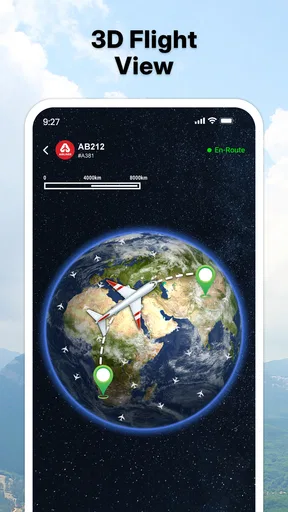
FlightRadar - Flight Tracker provides real-time flight tracking with comprehensive details about each flight, including departure and arrival times, aircraft type, altitude, and speed. Users can also access historical data, set alerts for specific flights, and explore 3D views of aircraft in flight. It’s equipped with a user-friendly interface that makes navigation simple.
Is FlightRadar - Flight Tracker free to use?
FlightRadar - Flight Tracker offers a free version with basic features. However, for advanced functionalities like detailed flight history, more frequent updates, and no advertising, users can opt for a premium subscription. The premium version enhances the user experience with additional features and customization options.
Can I track flights worldwide with this app?
Yes, FlightRadar - Flight Tracker provides global coverage, allowing users to track flights anywhere in the world. The app uses a network of data sources to ensure accurate tracking information is available for flights across different regions, making it a reliable tool for international travelers and aviation enthusiasts.
How accurate is the flight data provided by the app?
The app is known for its high accuracy, relying on a robust network of data from air traffic control systems, airlines, and ADS-B receivers. While it strives for precision, occasional discrepancies may occur due to transmission delays or data source limitations. Overall, it’s one of the most reliable flight tracking apps available.
What devices are compatible with FlightRadar - Flight Tracker?
FlightRadar - Flight Tracker is compatible with most Android and iOS devices. It requires a stable internet connection to function effectively. The app is regularly updated to ensure compatibility with the latest operating systems, providing a seamless experience across smartphones and tablets. Users should check for specific OS requirements before downloading.


